How to Install LED Strip Light for Kitchen Cabinet Step by Step
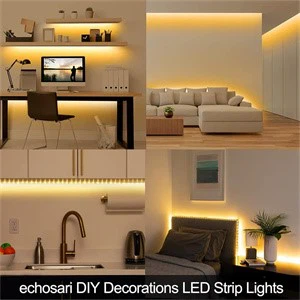
Kitchen cabinet lighting is a game-changer for both functionality and aesthetics-it eliminates dark spots under upper cabinets (where countertop prep often happens), highlights backsplashes, and adds a warm glow to evening meals. Among all kitchen lighting options, LED strip lights stand out: they're thin, flexible, energy-efficient (using 75% less power than incandescent strips), and customizable to fit any cabinet size.
But for many homeowners or DIY enthusiasts, installing LED strip lights can feel daunting-especially if you're new to electrical work. The good news? With the right tools, a clear step-by-step process, and a few pro tips, you can complete the installation in 1–2 hours (no electrician required). This guide breaks down everything you need to know, from choosing the right LED strip to hiding wires and testing the lights-tailored to both residential users and (foreign trade) buyers looking to recommend user-friendly products to their customers. By the end, you'll have a kitchen cabinet with seamless, bright lighting that elevates your space.
Step 1: Gather Tools and Materials (5 Minutes)
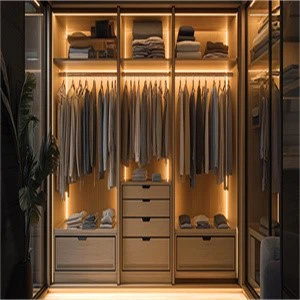
Before you start, make sure you have all the necessary tools and materials. Skipping this step can lead to frustrating delays mid-installation. Here's your checklist:
Essential Tools
Tape measure: To measure cabinet length and cut LED strips to size.
Scissors or utility knife: For cutting LED strips (look for the marked cut lines – more on this later).
Screwdriver set: Phillips and flathead (for removing cabinet screws if needed).
Wire strippers: To strip small sections of wire (if hardwiring to cabinet lights).
Level: To ensure LED strips are installed straight (no one wants lopsided lighting!).
Pencil: For marking installation positions on cabinets.
Voltage tester: To check if wires are live (critical for safety if hardwiring).
Materials You'll Need
LED strip lights: Choose a strip that fits your cabinet's needs (see "Pro Tip" below). For most kitchen cabinets, a 12V LED strip with 300–600 LEDs per metre (10–20 LEDs per foot) works best – this delivers bright, even light without overheating.
Power supply (driver): Must match the LED strip's voltage (e.g., 12V strip needs a 12V driver). Check the strip's wattage (e.g., 5W/m) and get a driver with 10–20% more wattage (to avoid overloading).
Mounting accessories: Most LED strips come with 3M adhesive backing, but for extra hold (especially in humid kitchens), use double-sided foam tape or mounting clips (ideal for uneven cabinet surfaces).
Wire connectors or electrical tape: To join wires (if extending strips or hardwiring).
Wire covers or cable management clips: To hide exposed wires (for a clean look).
Pro Tip for Buyers: Recommend LED strips with "cuttable every 5cm" design and IP65 waterproof rating to customers-cuttable strips fit odd-sized cabinets, and waterproofing resists kitchen steam (a common issue for cabinet lighting).
Step 2: Choose the Right Installation Position (10 Minutes)

Where you install the LED strip depends on your cabinet type and lighting goal. The most common positions for kitchen cabinets are:
1. Under Upper Cabinets (Most Popular)
Installing strips under upper cabinets lights up the countertop – perfect for chopping vegetables, reading recipes, or washing dishes. For best results:
Mount the strip 1–2 inches from the front edge of the cabinet bottom (not too far back, or light will be blocked by the cabinet overhang).
Use a level to mark a straight line with a pencil – this ensures the strip doesn't curve.
2. Inside Upper Cabinets (For Dark Shelves)
If your upper cabinets have deep shelves (where items get lost in shadow), install strips inside the cabinet, facing downward toward the shelves.
Mount the strip on the undersides of cabinet shelves (not the top; this avoids glare).
Choose a dimmable LED strip (via remote or app) so you can adjust brightness for different items (e.g., brighter for spices, dimmer for dinnerware).
3. Along Cabinet Toe Kicks (For Ambient Lighting)
To add warm ambient light to your kitchen floor (great for night raids to the fridge!), install strips along the toe kick (the small panel at the bottom of lower cabinets).
Mount the strip on the top of the toe kick, facing downward (this hides the strip while lighting the floor).
Use waterproof strips here-toe kicks can collect dust and moisture from mopping.
Pro Tip: Test the position with a temporary setup first – tape the strip to the cabinet (without removing the adhesive backing) and turn it on. This lets you adjust the placement before committing.
Step 3: Prepare the LED Strip (15 Minutes)

LED strips come in rolls (usually 2–5 meters long), so you'll need to cut them to fit your cabinet length and prepare the power connection.
1. Measure and Cut the Strip
Use a tape measure to find the exact length of your cabinet (e.g., 120cm for a standard upper cabinet).
Locate the cut lines on the LED strip – these are marked with scissors icons or dashed lines, usually every 5–10cm. Never cut between LEDs (this will break the circuit).
Cut the strip along the marked line with scissors or a utility knife – apply gentle pressure to avoid damaging the LEDs or copper contacts.
2. Prepare the Power Connection
Most LED strips use one of two power methods: plug-and-play (easy for beginners) or hardwiring (for a permanent, wire-free look).
Option A: Plug-and-Play (Best for Beginners)
Many LED strips come with a pre-attached DC connector (the small plug that connects to the power supply). If not, attach a DC connector to the strip's copper contacts:
Peel back 1cm of the strip's protective coating to expose the copper pads (usually labelled "+" and "-").
Insert the connector's pins into the copper pads (match "+" to "+" and "-" to "-"; reversing them will prevent the strip from turning on).
Secure the connector with the built-in clamp or electrical tape (to avoid loose connections).
Plug the DC connector into the power supply, then plug the power supply into a nearby outlet.
Option B: Hardwiring (For Permanent Installation)
If you want to hide the power cord (e.g., connect to existing cabinet light wiring), follow these steps (note: turn off power at the circuit breaker first!):
Cut off the DC connector from the strip (if present) and strip 1cm of insulation from the strip's wires (exposing copper).
Use a voltage tester to confirm the existing cabinet wires are not live.
Connect the strip's "+" wire to the cabinet's "hot" wire (usually black or red) and the strip's "-" wire to the "neutral" wire (usually white or blue)-use wire connectors (twist-on or push-in) to secure the join, then wrap with electrical tape.
Mount the power supply inside the cabinet (use double-sided tape) to hide it.
Pro Tip for Safety: If you're unsure about hardwiring, stick to plug-and-play. Electrical mistakes can cause fires – always consult an electrician if you're working with household wiring.
Step 4: Clean and Prep the Cabinet Surface (10 Minutes)
LED strips rely on adhesive to stay in place, and dirt, grease, or dust will ruin the bond. Take time to clean the cabinet surface – this ensures the strip stays mounted for years.
1. Clean the Installation Area
Use a mild degreaser (like dish soap mixed with water) or rubbing alcohol to wipe the cabinet surface (where you'll mount the strip). Kitchen cabinets collect grease from cooking, so pay extra attention to areas near stovetops.
Dry the surface completely with a lint-free cloth – moisture will weaken the adhesive.
2. Test the Strip Before Final Mounting
Plug in the strip (or turn on the hardwired power) to ensure all LEDs light up. If some LEDs don't work, check the connector (it may be loose) or the cut line (you may have cut between LEDs by mistake).
Adjust the strip's position if needed-this is your last chance to fix alignment before mounting.
Step 5: Mount the LED Strip (15 Minutes)
Now it's time to attach the strip to the cabinet. Follow these steps for a secure, straight installation:
1. Peel and Stick (For Adhesive Strips)
Remove the protective backing from the LED strip's 3M adhesive-peel 1–2 inches at a time (this prevents the strip from sticking to itself).
Align the strip with the pencil line you marked earlier, then press it firmly against the cabinet surface – start at one end and work your way to the other, applying pressure as you go (use your fingers or a credit card to smooth out bubbles).
For extra hold (especially in humid kitchens), add mounting clips every 10–15 cm. Screw the clips into the cabinet (or use adhesive clips) to secure the strip.
2. Hide Exposed Wires (For a Clean Look)
Use cable management clips (adhesive or screw-on) to route wires along the back or inside of the cabinet – avoid leaving wires hanging (they'll catch on dishes or look messy).
For plug-and-play setups, use a cord concealer (a plastic channel that sticks to the cabinet) to hide the power cord from the strip to the outlet. Cut the concealer to length, peel the adhesive backing, and press it over the cord.
If the power outlet is far from the cabinet, use an extension cord with a flat plug (it fits behind the cabinet without sticking out) and hide it with cord clips.
Step 6: Test and Adjust the Lighting (5 Minutes)
Once the strip is mounted and wires are hidden, it's time to test the lighting and make final adjustments.
1. Test the Lights
Turn on the power (plug in the supply or flip the circuit breaker) and check that all LEDs are working. Walk around the kitchen to ensure there are no dark spots-if the strip is too short, you can connect an extension strip (use DC connectors to join them, matching "+" to "+").
2. Adjust Brightness or Color (If Applicable)
If you have a dimmable or color-changing LED strip (via remote, app, or wall switch), try these features:
For countertop prep, set brightness to 80–100% (you need clear light to chop safely).
For ambient lighting (e.g., dinner parties), dim to 30–50% and choose warm white (2700K–3000K) for a cozy feel.
Avoid cool white (4000K+) under upper cabinets – it can make the kitchen feel sterile.
3. Check for Glare
If the light is too bright or causes glare (especially on shiny countertops like granite), add a diffuser (a plastic cover that fits over the LED strip). Diffusers soften the light and eliminate glare-they're available in clear or frosted options and stick to the cabinet like the strip.
Step 7: Maintain the LED Strip (Long-Term Tips)
To keep your kitchen cabinet LED strips working for 5–10 years (their expected lifespan), follow these maintenance tips:
Clean the strip every 3–6 months: Use a dry microfibre cloth to wipe dust off the LEDs – dust blocks light and causes overheating.
Avoid moisture damage: Wipe up spills near the strip immediately, and choose waterproof strips if your kitchen is humid (e.g., near a dishwasher or sink).
Replace the power supply if needed: If the strip flickers or stops working, the power supply is likely the issue (not the strip). Replace it with a matching voltage/wattage supply-they cost \(10–\)20 and are easy to swap.
Don't overload the strip: Never connect more LED strips than the power supply can handle (check the supply's wattage rating). Overloading causes overheating and shortens lifespan.
Common Mistakes to Avoid
Even DIY pros make mistakes – here are the top ones to skip:
Cutting the strip in the wrong place: Always cut along marked lines – cutting between LEDs breaks the circuit, and the strip won't work.
Forgetting to clean the cabinet: Grease and dust ruin adhesives. Spend extra time cleaning, or the strip will fall off in weeks.
Using the wrong power supply: A 24V supply with a 12V strip will burn out the LEDs; a 12V supply with a 24V strip won't turn on. Always match voltage and wattage.
Leaving wires exposed: Exposed wires are a tripping hazard and look unprofessional – use cord clips or concealers to hide them.
Mounting the strip too far back: If the strip is mounted against the cabinet's back wall, the countertop will still be dark. Mount it 1–2 inches from the front edge.
Conclusion
Installing LED strip lights for kitchen cabinets is a simple, affordable way to upgrade your kitchen – and you don't need to be an electrician to do it. By following this step-by-step guide, you'll have bright, even lighting that makes cooking easier and your kitchen look more modern.
For buyers, this guide also highlights key selling points to emphasise to customers: cuttable strips for a custom fit, waterproof designs for kitchen humidity, and plug-and-play installation for beginners. Whether your customers are homeowners or interior designers, a user-friendly LED strip (paired with clear installation instructions) will stand out in the market.
Remember: The key to a successful install is preparation – gather your tools, choose the right position, and take time to clean the cabinet. With a little patience, you'll have a kitchen that's both functional and beautiful – all thanks to LED strip lights.
Shenzhen Benwei Lighting Technology Co., Ltd.
Telephone: +86 0755 27186329
Mobile(+86)18673599565
Whatsapp :19113306783
Email:bwzm15@benweilighting.com
Skype: benweilight88
Web: www.benweilight.com